


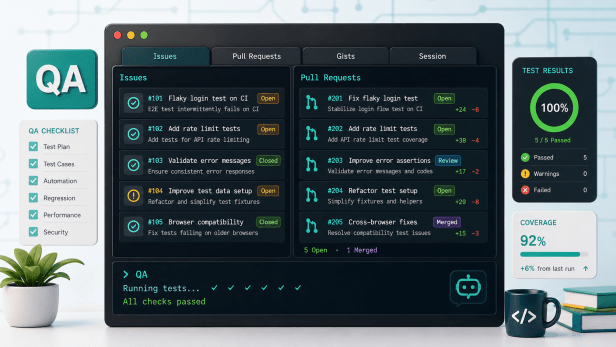
GitHub announced on June 23, 2026 that the redesigned GitHub Copilot CLI terminal interface is now generally available. The update brings a tabbed terminal layout for GitHub work, improved configuration flows, and a cleaner interface for agent-style coding sessions.
For QA engineers and automation testers, the important point is practical: Copilot CLI is becoming a more useful terminal workspace for issue triage, pull request review, CI investigation, and test automation maintenance without constantly switching between a browser, IDE, and shell.
What GitHub changed on June 23
- Tabbed CLI layout: GitHub says interactive Copilot CLI sessions now include tabs at the top of the terminal.
- Repository-aware tabs: when the CLI runs inside a GitHub repository, Issues and Pull requests tabs appear for that repository.
- Gists and Session tabs: users can switch between the normal chat session and GitHub content using the keyboard or mouse where supported.
- Prompt context from GitHub items: GitHub Docs describe using selected issues, pull requests, and gists as context for Copilot prompts.
- Configuration updates: the changelog highlights a new experience for configuring tools and a cleaner, more accessible interface.
Why this matters for QA engineers
QA work often starts with scattered evidence: a failing issue, a pull request, a CI log, a flaky test file, and a local reproduction command. A stronger terminal interface reduces friction when the tester is already working in the shell.
- Faster triage: testers can pull issue or PR context into a CLI session before asking for a failure summary or suspected test impact.
- Cleaner review loops: automation reviewers can move from a pull request reference to targeted prompts about assertions, fixtures, selectors, and regression coverage.
- Less context switching: the terminal can become the working surface for reading the task, asking Copilot for analysis, running commands, and reviewing output.
- Governance still matters: GitHub’s CLI docs note trust prompts and tool approval flows when Copilot may read, modify, or execute files in a directory.
A practical QA rollout check
- Start with one low-risk automation repository and confirm the organization policy allows Copilot CLI use.
- Open Copilot CLI from the repository root so Issues and Pull requests tabs are available.
- Select a failing bug issue or test-related PR and insert it into the prompt context.
- Ask Copilot for a short triage note: likely affected tests, missing evidence, and the safest validation command.
- Approve only the tool calls you understand, then review every file change and command result before using the output.
What QA teams should watch
- Read-only tabs are not a substitute for review: GitHub Docs describe Issues, Pull requests, and Gists tabs as read-only browsing surfaces, with actions routed through GitHub.com or Copilot prompts.
- Trust prompts are meaningful: only allow Copilot CLI to work in directories where the repository and local files are safe for that session.
- Generated fixes need evidence: a suggested test update should still include a failing-before and passing-after validation step.
- Model output can vary: treat Copilot’s explanation as a starting point, not a final QA decision.
Bottom line
The GitHub Copilot CLI terminal interface GA release is not just interface polish. It makes terminal-based AI workflows more usable for the messy middle of QA work: issue context, PR context, local commands, and evidence review. QA teams should pilot it on triage and automation maintenance tasks where the value can be measured quickly.